


If you have opened HubSpot recently and spotted a new Agents item in your navigation, that is Agent Hub. HubSpot launched it in public beta on 23 July 2026 for all Professional and Enterprise customers, alongside a second tool called Agent Builder.
Here is the short version. Agent Hub is where you see and manage every AI agent running in your business. It includes the built-in HubSpot agents, any agents you add from the Agent Marketplace, and the custom agents you build yourself. Together they replace what HubSpot previously called Breeze Agents, which sat scattered across different corners of the platform rather than in one home.
The problem HubSpot is trying to solve
HubSpot's own framing of the problem is a good one. A sales prospecting agent reaches out to a contact in the same week a service agent is working through an open complaint from that same account, and neither agent knows the other exists. Multiply that across marketing, sales and service and you get duplicated outreach, contradictory messages, and a customer experience that feels like it is coming from three different companies.
There is a second problem underneath it - when a leadership team asks what the AI investment is actually producing, most teams cannot answer cleanly, because the agents are reporting into different places and measuring different things.
There is a third problem too: agent sprawl. Many companies are already experimenting with custom projects in tools like ChatGPT, Claude or standalone agent platforms, then trying to connect those back into their CRM. HubSpot's answer is to bring that work closer to the customer data, context and processes already sitting inside the CRM, rather than letting every team build its own disconnected AI layer.
What is actually different now?
One place instead of several
Every agent active in your account appears in Agent Hub: HubSpot's pre-built agents, anything installed from the Agent Marketplace, and anything you have built yourself. You can see live status and performance, and switch on agents you have not activated yet.
Shared context
Agent Hub has a Context tab where you define the business information Breeze needs to work more effectively: brand kit, locations, company information, customer profiles, ICPs, sales frameworks, processes and other operating context.
There is also personal context, such as email personality, for how an individual wants AI to work with them. Underneath that sit knowledge vaults for more specific material such as product detail, internal documentation or support guidance, which can be used by custom agents and Breeze Assistant projects. The point is that your agents work from one picture of your business and your customers rather than several.
Outcomes measured by goal
Rather than organising agents by which hub they happen to live in, Agent Hub groups them by what they are meant to achieve: building demand, winning deals, delighting customers and scaling growth. That is a more useful reporting structure when someone asks what your AI is doing for the business.
The agents, and what each one actually does
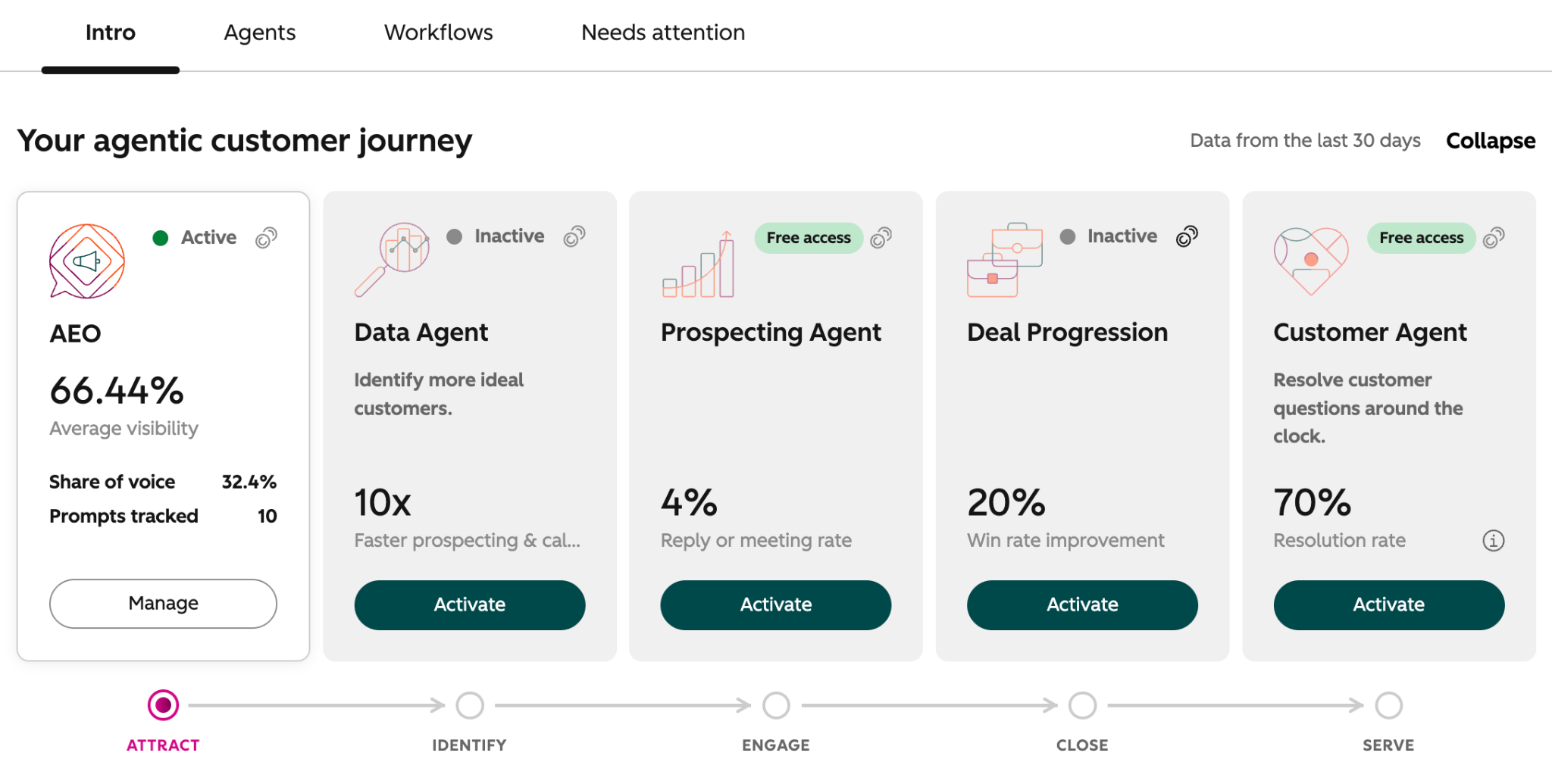
Agent Hub presents these as cards on your agentic customer journey. You activate what you want and leave the rest off. You can also start from templates, create your own agent, or add more HubSpot built agents from the Agent Marketplace.
The exact agents and options you see can depend on your portal, permissions, subscription and beta access, so treat this as a product area to review inside your own account rather than a fixed universal menu.
AEO (answer engine optimisation)
Tracks how your brand appears when buyers ask AI tools like ChatGPT, Claude and Gemini questions, and recommends what to create to show up in those answers. In practice: you find out that you are invisible for "best HubSpot partner for sports and entertainment" and get a content recommendation to fix it.
Data agent
Enriches and maintains your CRM data. In practice: a new contact comes in with an email address and nothing else, and the agent fills in company, industry and role so your segmentation and routing actually work.
Prospecting agent
Researches target companies and generates personalised outreach. In practice: it reviews an account's website, recent activity and deal history, then drafts an outreach recommendation your rep reviews and sends.
Deal progression
Gives sales teams AI recommendations on the next step for an open deal. In practice: a deal has sat in the same stage for three weeks and the agent surfaces the specific next action based on what has happened on the record.
Customer agent
Responds to support conversations and resolves requests. In practice: it handles the recurring "how do I reset my password" and "where is my order" questions end to end, and escalates the ones it should not touch.
You can also build your own agents for niche or custom business processes. For example, you might start from a template such as sending an email series after a form submission or creating and assigning a task when a new deal is created, or you might start from a blank agent and define the instructions, actions, inputs and knowledge yourself.
Does it use credits, and how should you budget for it?
This is the question we get asked most, and the answer is scattered across half a dozen HubSpot pages, so here it is in one place.
Agent Hub itself has no separate price tag. It is included with Marketing Hub, Sales Hub, Service Hub, Data Hub and Content Hub Professional or Enterprise, plus Smart CRM. Usage is what you pay for, through HubSpot Credits.
A few mechanics worth knowing:
- Credits are consumed when specific actions are performed, not simply because a feature is switched on. HubSpot moved Customer Agent and Prospecting Agent to outcome-based pricing in April 2026, so those agents are charged when the task lands. HubSpot's broader credit guidance says credits are required for certain usage-based features, including Customer Agent, Prospecting Agent, Data Agent and Data Studio syncs, and are used when specific actions are performed.
- Every paid seat-based subscription includes a monthly credit allowance, based on your highest subscription tier and visible in your account. Included credits reset monthly and do not roll over.
- You can add more credits either in packs or through pay-as-you-go, depending on whether you want predictability or flexibility.
- You can cap spend. Set a global credit limit across the account, or set limits on individual agents and features.
On published rates as of August 2026, HubSpot lists a credit at $0.01 USD. Customer agent is listed at 50 credits per resolved conversation, prospecting agent at 100 credits per recommended lead, and data agent at 10 credits per response. Credit packs are listed at $10 per 1,000 credits. HubSpot has updated its agent pricing model several times this year, most recently moving Customer Agent and Prospecting Agent to outcome-based pricing in April 2026, so these figures are subject to change. Always confirm current rates against your own portal and your HubSpot quote before you commit to a budget.
The practical way to budget is to test first, then model usage
-
If you already have credits available, spend time running low-risk tests, checking run history and seeing what each agent actually consumes in your portal.
-
Then look at the volume behind the use case: how many records, conversations, deals or contacts the agent could act on; how often it would run; what condition your data is in; and whether the agent is likely to complete the action or need human review.
-
You cannot answer the cost question properly until you know both the credit rate and the likely usage pattern.
-
For example, if you resolve 400 support conversations a month and expect the customer agent to handle half of them, that is 200 resolutions, 10,000 credits, roughly $100 USD a month. Model your two or three highest-volume use cases the same way, compare that against your included allowance, then set a cap.
Building your own agents in Agent Builder
This is the part with the most potential as the Agent builder lets non-technical people create custom agents on a single canvas, using the data already sitting in your CRM, with no code required.
Because the agent is built inside HubSpot, it runs on your own context: deal history, contact records, call transcripts and buying signals. There is no separate setup or field mapping to maintain.
HubSpot's own launch example is a good illustration of the scale to aim for. Ignite Reading, a virtual literacy tutoring program operating across more than 25 US states, built an agent that automatically finds and parses each school district's academic calendar using the domain and school year already stored on the deal record. According to HubSpot, a task that previously took 15 to 20 minutes per district now takes seconds, saving the team more than 350 hours a year.
What this means if you are already using HubSpot
If you are on Professional or Enterprise, you may already have access to Agent Hub. That does not automatically mean every agent is usable in your portal. Specific agents can still depend on the right hub, subscription, permissions, beta access and available credits. For example, you may be able to see an AEO agent card, but not get useful access unless your Marketing Hub setup and permissions support it. Nothing has been taken away, and there is no forced migration. The agents you were running as Breeze Agents carry forward.
The honest caveat is that Agent Hub amplifies whatever process and data quality you already have. An agent applying consistent logic to inconsistent data will produce inconsistent results faster and more confidently. Before you activate anything, it is worth asking whether your CRM data is reasonably clean and deduplicated, whether lifecycle stages mean the same thing across teams, and whether the process you are about to automate is actually defined.
A sensible sequence: sort your data foundations, switch on one agent in the hub you use most, test it in a low-stakes situation first, measure it for a month, then expand. For example, trial an agent on internal contacts, a small segment or a process with human review before letting it run across high-value customer journeys. Resist the urge to activate all five at once.
What this means if you are considering HubSpot
If you are evaluating HubSpot against other platforms, Agent Hub changes the comparison in two ways.
First, the AI layer is included rather than sold as a separate product, with usage charged on completed outcomes. That makes the cost easier to model than a per-seat AI add-on, though it does introduce a variable line item you need to cap.
Second, and more importantly, the agents run on CRM data that already exists in one place. Much of the difficulty in getting AI agents to work well sits in giving them reliable, connected context. If your customer data is already unified in the CRM, you have skipped the hardest part. If it is spread across a ticketing platform, a booking system, a finance tool and three spreadsheets, no agent layer will fix that on its own, and your implementation approach matters far more than the agent features on the pricing page.
How Engaging.io can help
The hard part of agentic AI is rarely the agent. It is the data architecture and the integrations underneath it, which is the work we have specialised in as an Elite HubSpot Solutions Partner since 2009.
In practice that means three things: assessing whether your CRM data is genuinely ready for agents to act on it, connecting the systems that hold the context your agents need, and designing custom agents around a defined process rather than an undefined one. If you would like a view on where your portal sits, our AI services team can walk you through it.
FAQs