



If your team has outgrown a basic website and you’re looking for a fresh start, the platform question comes up fast. Which CMS will we use? While a platform like WordPress is a solid, flexible starting point for a lot of businesses, once your marketing grows beyond a brochure site, it's worth asking whether that platform still fits where you're headed.
That's where HubSpot CMS earns a serious look. For teams that want real analytics, fast pages, and a simpler tech stack, building the website directly on the same CRM platform as the rest of your marketing drastically changes what's possible day to day as well as your overall website performance.
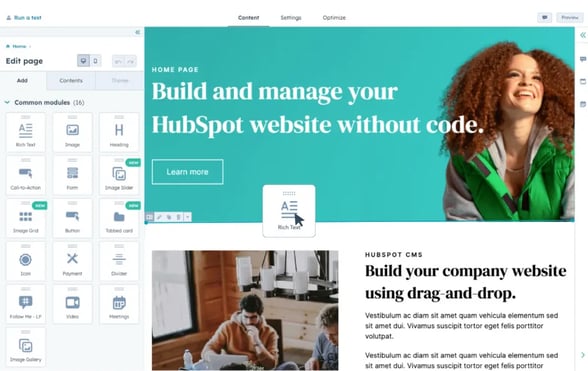
What’s great about HubSpot CMS?
HubSpot CMS takes a different starting point. The website isn't a separate system you connect to your CRM, it's built on the same platform as your contacts, your email, and your reporting. That changes what your team can actually achieve, and trust us - makes for some very happy marketers.
-
Smart content: Pages can show different content depending on who's looking. A returning customer sees a different message to a brand new visitor, automatically, based on the list or segment they sit in. No separate personalisation tool required.
-
Zero maintenance hosting: Hosting, security, updates and speed optimisation are handled by HubSpot as part of the platform. Your team can focus on the content and the campaigns, and your IT department will be keen to pass this off.
-
Drag and drop, with real customisation: Marketing teams can build and update pages themselves, without raising a dev ticket for every change. The flexibility for deeper customisation is still there when you need it, but the time saved on a weekly basis creates a frictionless workflow.
-
One platform, no context switching: Your website lives in the same place as email, CRM and reporting. No plugins bridging the gap and no exporting data from one tool to make sense of it in another. If you’ve ever had a plugin update and break, you’ll know this isn’t just a context switching advantage.
-
Direct ROI tracking: Because the CMS and the CRM share the same data, you can see exactly who clicked what, and whether they went on to convert. Attribution isn't a project, it's just there. It also connects with Google Analytics, Google Search Console and Meta - you have true visibility in one platform.
It's also worth knowing about content remix, a newer HubSpot feature that lets you turn one piece of content into multiple formats for different channels. While not every team may use it, it points to where the platform is heading: less manual repurposing, more leverage from the content you've already made.
How Engaging.io can help with this
We've built HubSpot CMS websites for businesses outgrowing WordPress, and for businesses already on HubSpot who wanted their website connected to it.
A recent example is Menicon, a global leader in contact lens technology. They came to us with a fragmented web presence spread across two separate CMS platforms and needed a single, scalable foundation that could serve regional markets without losing brand consistency. We unified 15+ regional websites inside HubSpot CMS Enterprise, building two modular design systems and giving local marketing teams the ability to manage their own content without a developer in the loop.

As a HubSpot Elite Partner, the focus is always the same: a website your marketing team can manage themselves, connected to the data you already have, without a developer in the loop for everyday changes. We know the value of empowering your own team with a capable platform, and HubSpot CMS brings flexibility and consistency in a user friendly interface.
If your team is past the point where a basic website is enough, is wasting time chasing updates and submitting IT support tickets, or you're ready for a platform built to do more of the work for you, it might be time to take a proper look at HubSpot CMS. You can see how we approach these builds on our HubSpot CMS websites page, or read how it played out for Menicon.
Thinking about what this could look like for your team? Get in touch and we'll talk through what a HubSpot CMS website could mean for your marketing.
Frequently asked questions
We already use HubSpot for our CRM. Should our website be on HubSpot CMS too?
Not necessarily, but there are real advantages to having both in one place.
The data side is one part of it. HubSpot CMS connects your website, contacts, and campaigns natively, so you're not stitching together reports across platforms. And while HubSpot does integrate with tools like WordPress and Squarespace, a separate CMS still adds a layer of coordination that your team has to manage.
The bigger win is often operational. With a separate CMS, routine website updates can turn into a process; waiting on IT approvals, exporting files, going through security checks, or pulling in a developer or agency when something breaks. Changes that should take minutes can take days. HubSpot CMS puts content updates directly in the hands of your marketing team, without the back-and-forth.
It also simplifies your security footprint. Instead of managing access, updates, and vulnerabilities across two platforms, you're working within one hosted, maintained environment.
HubSpot CMS tends to make the most sense when you want your marketing team to move quickly and independently, without waiting on IT, agencies, or dev support every time something needs to change.
Will our marketing team be able to manage the site without a developer?
Yes, that's the point of the platform. A well-built HubSpot CMS site uses a modular design system so your team can create pages, update content and launch landing pages themselves. Developers are needed for major structural changes, not day to day edits.
Can a HubSpot CMS website show different content to different visitors?
Yes, and it's built into the platform. Smart content blocks change what a visitor sees based on their lifecycle stage or other CRM data, with no separate tool required.
Does moving from WordPress to HubSpot CMS mean losing our SEO rankings?
Not if it's done properly. A careful migration audits the existing URL structure and content first, then rebuilds title tags, meta descriptions, headings and redirects before the new site goes live.
How does the cost of HubSpot CMS compare to WordPress?
The platform cost itself is usually higher, since HubSpot CMS comes bundled into a HubSpot subscription and is a much more advanced CMS offering. But total cost of ownership often tells a different story. WordPress costs tend to show up over time, in developer hours, plugin licences, and hosting and security management. With HubSpot CMS, a lot of that is folded into the platform. The right comparison depends on your scope and how your team is set up, which is something worth scoping properly rather than assuming.