The Implementation
Every integration runs through one Laravel middleware application, with queue-based job processing so data moves reliably between systems that each run on their own triggers.
The Tech Stack
-
Middleware: Laravel (PHP framework), queue-based job processing for asynchronous and retry-safe data handling.
-
Authentication: OAuth 2.0 client credentials flow via Microsoft Entra ID (formerly Azure Active Directory) for SharePoint access; subscription-key authentication on Azure API Management for Framework.
-
APIs consumed: HubSpot CRM API v3 and v4, Microsoft Graph API, Framework REST API (Azure-hosted), ClickHome REST API v2, PandaDoc API.
-
HubSpot developer tools used: private app tokens, webhook subscriptions, HubSpot File Manager API, custom code workflow actions, CRM object and association APIs.
Solution Architecture
Custom Integration 1: Framework - opportunity and estimates sync
Framework is CPG’s estimating platform, holding house types, specifications, pricing and job numbers. Creating a deal with a primary customer contact creates the Framework opportunity with customer and land and site details, and changes to mapped fields keep it current.
Consultants build estimates in Framework. Every version updates an estimates table and the job number, house type, facade, specification and price on the deal, and its PDF replaces the previous one.
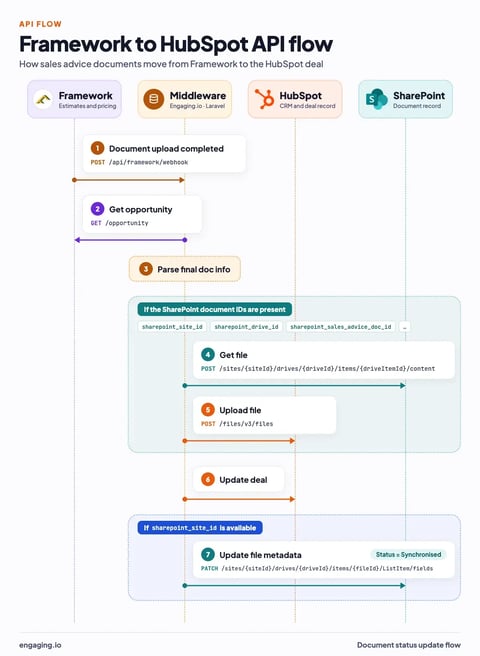
Image 1: Integration overview, showing how the middleware connects HubSpot to each platform and to LME’s portal
Custom Integration 2: ClickHome - tender and contract sync
ClickHome tracks the progress of every home through the build. For this integration, deal creation also opens a ClickHome lead, kept current as job number, owner and site details change. From tender onwards ClickHome drives the pipeline: tender and contract presented and accepted dates sync back and move the deal stage. Sales and operations teams can see where every deal sits from tender to contract without leaving HubSpot or waiting on a manual update.
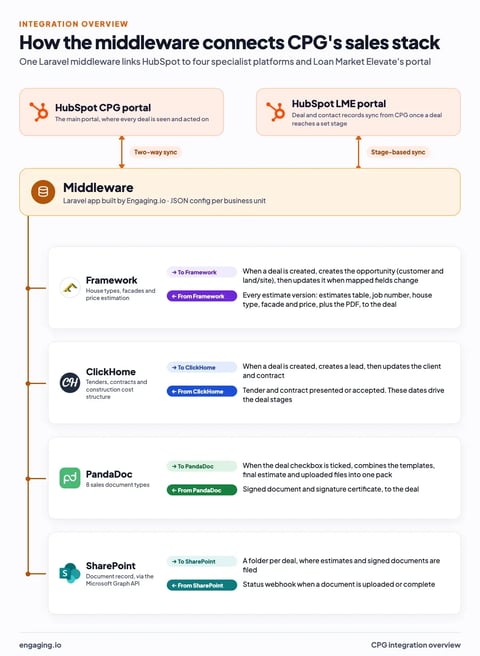
Image 2: Document status flow, from trigger on the deal to signed and filed in SharePoint.
Custom Integration 3: PandaDoc - sales paperwork engine
Checkbox properties on the deal, gated by deal stage, trigger eight document types, from the tender request fee to sales paperwork for the customer, vendor and operations. The middleware aggregates templates, the final Framework estimate and customer files into one document with embedded signature fields, usually within one to three minutes.
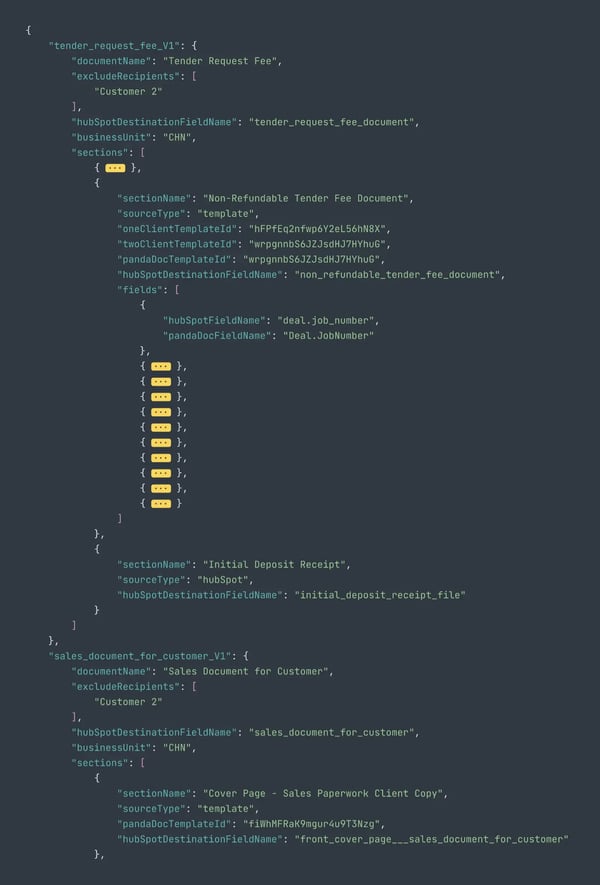
The locked draft appears on the deal for review and sending. Rules per business unit run from a JSON configuration, and an Integration Notes property surfaces any processing errors on the deal.
Customers can sign by email or in person. Once every party has signed, a webhook prompts the middleware to collect the signed PDFs and signature certificates and file them into the matching file properties on the deal, replacing the drafts.
Image 3: Excerpt from the JSON configuration that sets paperwork rules per business unit.
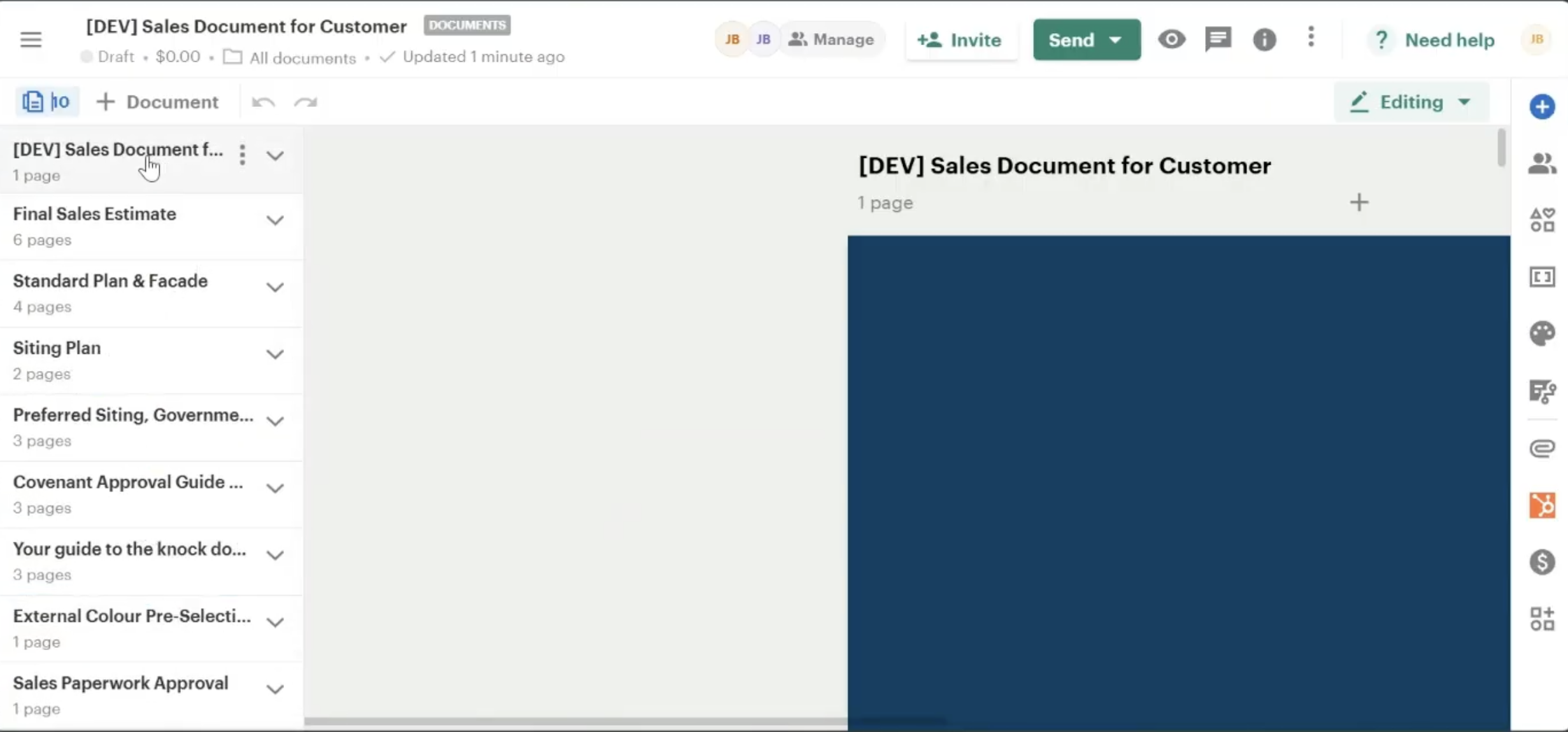
Images 4 and 5: A document triggered from the HubSpot deal record, and the PandaDoc template it generates from HubSpot properties.
Image 4: The custom deal dropdown property which acts as the trigger.
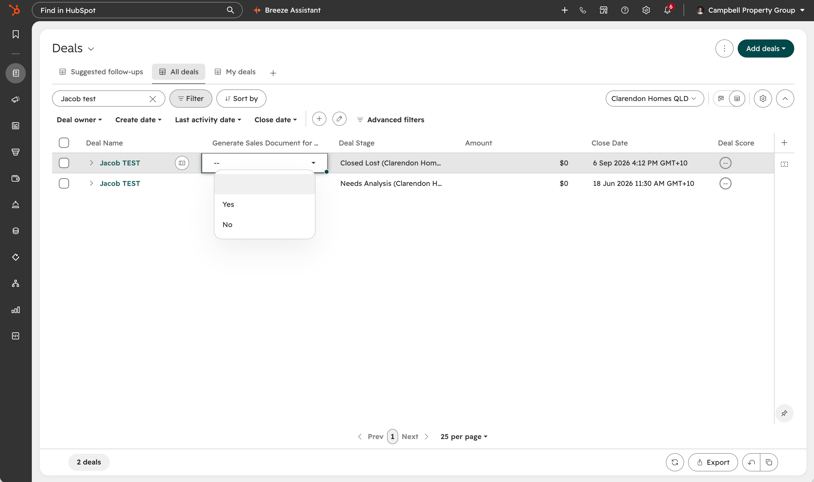
Image 5 - The corresponding template generated in PandaDoc
Custom Integration 4: SharePoint document record
The middleware creates a folder per deal through the Microsoft Graph API, files every estimate and signed document, writes the folder mapping back to HubSpot, and listens for status webhooks so each document shows as uploaded or complete.
Cross-portal sync: CPG to Loan Market Elevate
LME launched with its own HubSpot portal and a five-broker team. When a deal reaches a set stage in CPG’s main portal, the middleware syncs the deal and contact records into LME’s portal. Together with custom-coded workflows, this triggers lead allocation, pipeline stage updates and workflow automation for the brokers.
Across both portals, Engaging.io also configured over 100 custom properties, 20+ workflows, 21 dashboards and 97 custom reports across the four business units in CPG’s main portal.